EN
EN


How to Choose Machine Vision Light Controller: Guide
A machine vision light controller is not simply a power supply placed between a light and a camera. It determines how consistently the LEDs are driven, when illumination arrives relative to exposure, and whether the image remains stable as line speed or ambient conditions change. For a system integrator, the practical question is not “Which controller is brightest?” but “Which controller gives this light, camera, and inspection task a repeatable image?”
This guide gives you a requirement-first way to choose a machine vision light controller. Start with the inspection target and imaging sequence, then confirm electrical, timing, thermal, and integration requirements before comparing models.
Start With the Inspection Task, Not the Controller Catalog
Write down what must be visible in the image: a missing feature, print quality, a scratch, a dimension, a code, or a surface texture. Then document the part material, surface finish, field of view, working distance, camera exposure, and conveyor speed. These details decide whether illumination should be continuous, gated, or strobed.
My original approach on a reflective-metal inspection project was to pick the brightest available light and then seek a controller with the highest output. The actual issue was not brightness; specular reflections were masking the defect contrast. Changing the illumination geometry and controlling the pulse at the right point in the camera sequence produced a more useful image. This holds true when the inspection surface is matte and stable—but high-gloss, curved, or textured parts need their own test images.
For most projects, select the light geometry first—such as ring, bar, dome, coaxial, or backlight—and choose the controller that is explicitly compatible with that light head. A machine vision light controller cannot correct an unsuitable illumination angle or wavelength.
Choose the Right Operating Mode
Continuous mode
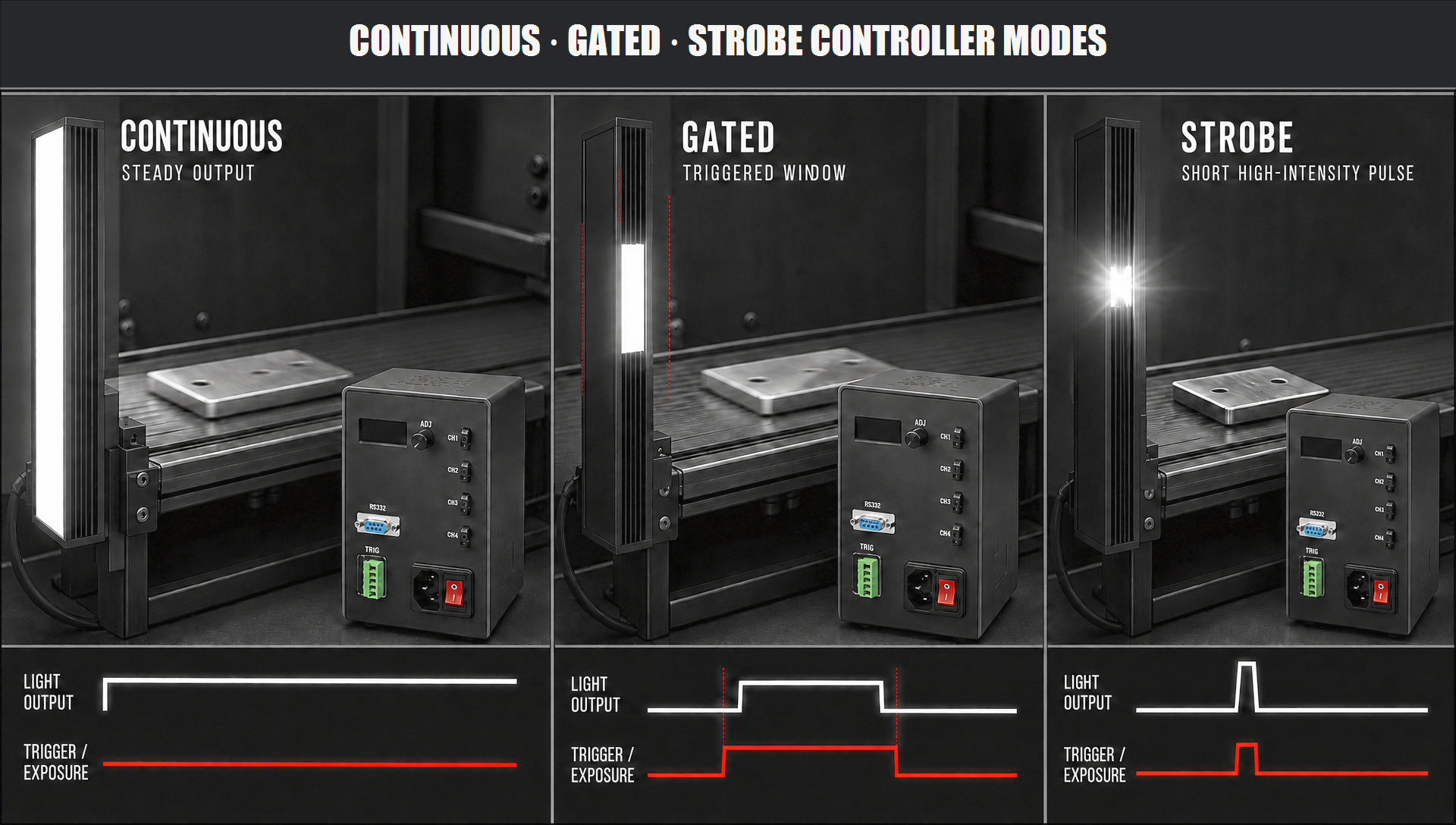
In continuous mode, the light remains on during operation. It is often appropriate for stationary parts, moderate exposure times, and processes where a constant image is more important than peak intensity. Verify that the controller can supply the required continuous current without exceeding the light’s thermal operating limit. A controller with a strong strobe specification is not automatically the right continuous-duty choice.
Gated or switched continuous mode
Gated operation turns the light on only for a defined portion of the cycle, usually in response to a trigger. It can reduce unnecessary heat and help isolate the inspection from ambient light. The key check is repeatability: confirm trigger input type, trigger-to-output delay, and whether the timing remains stable at the actual production rate.
Strobe mode
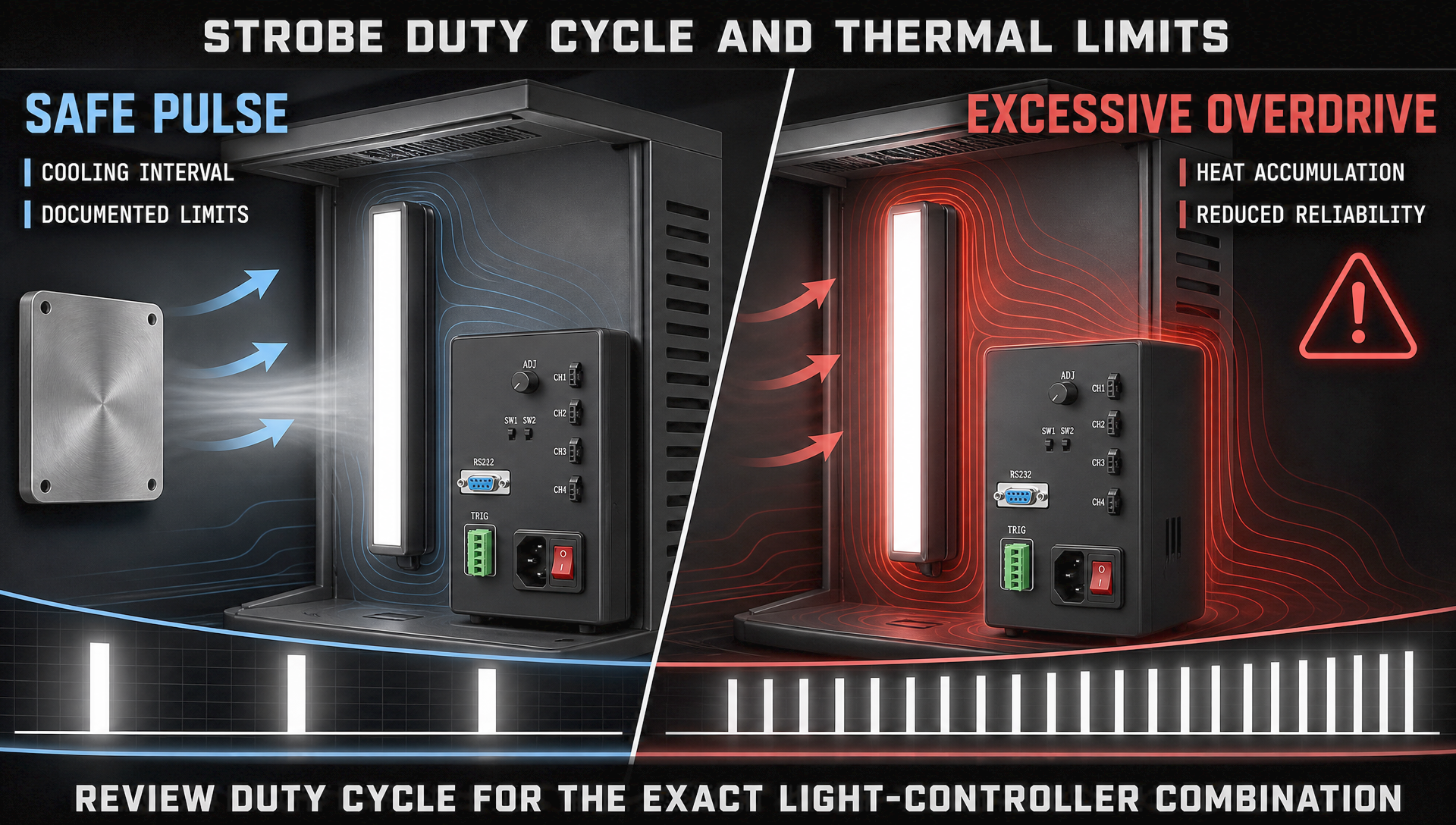
Strobe mode delivers a short, high-intensity pulse synchronized with the camera exposure. It is useful for fast-moving products because a short pulse can help freeze motion without demanding an impractically long exposure. However, strobe capability must be evaluated as a system. Pulse width, repetition rate, duty cycle, cable length, and the light head’s permitted overdrive rating all matter. More current is not automatically better; excessive drive or inadequate cooling can shorten LED life and undermine image consistency.
Match Electrical Specifications to the Light Head
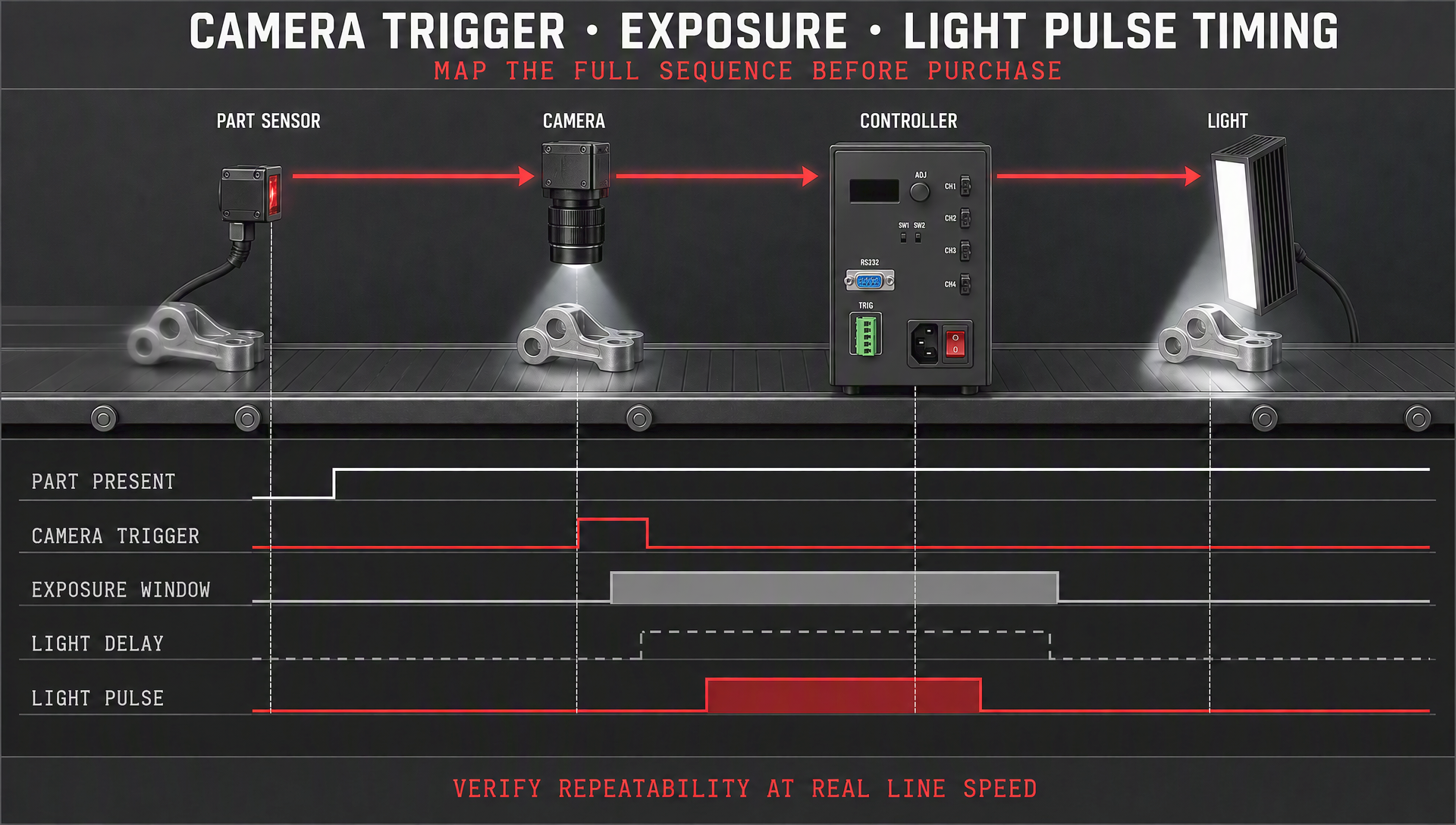
Read the light and controller datasheets together. The essential comparison is the output method and range: constant-current output is generally preferred for controlling LED current accurately, while the controller’s voltage range must accommodate the connected light and cable arrangement. Check the number of channels as well. One channel may be enough for a single light, but multi-view inspection, color changes, or independently controlled zones often require separate channels.
Next, compare the controller’s current range with the light’s rated continuous and pulsed current. Do not assume that a high maximum rating means it is safe for every light. Confirm connector type, polarity, channel load limits, supply-voltage requirements, and whether the chosen configuration needs an external power supply. When the datasheet lists a strobe current, ask under what pulse width and duty-cycle conditions it was measured.
Controller timing, illumination, and camera exposure must work as one sequence.
Evaluate Timing and Camera Synchronization
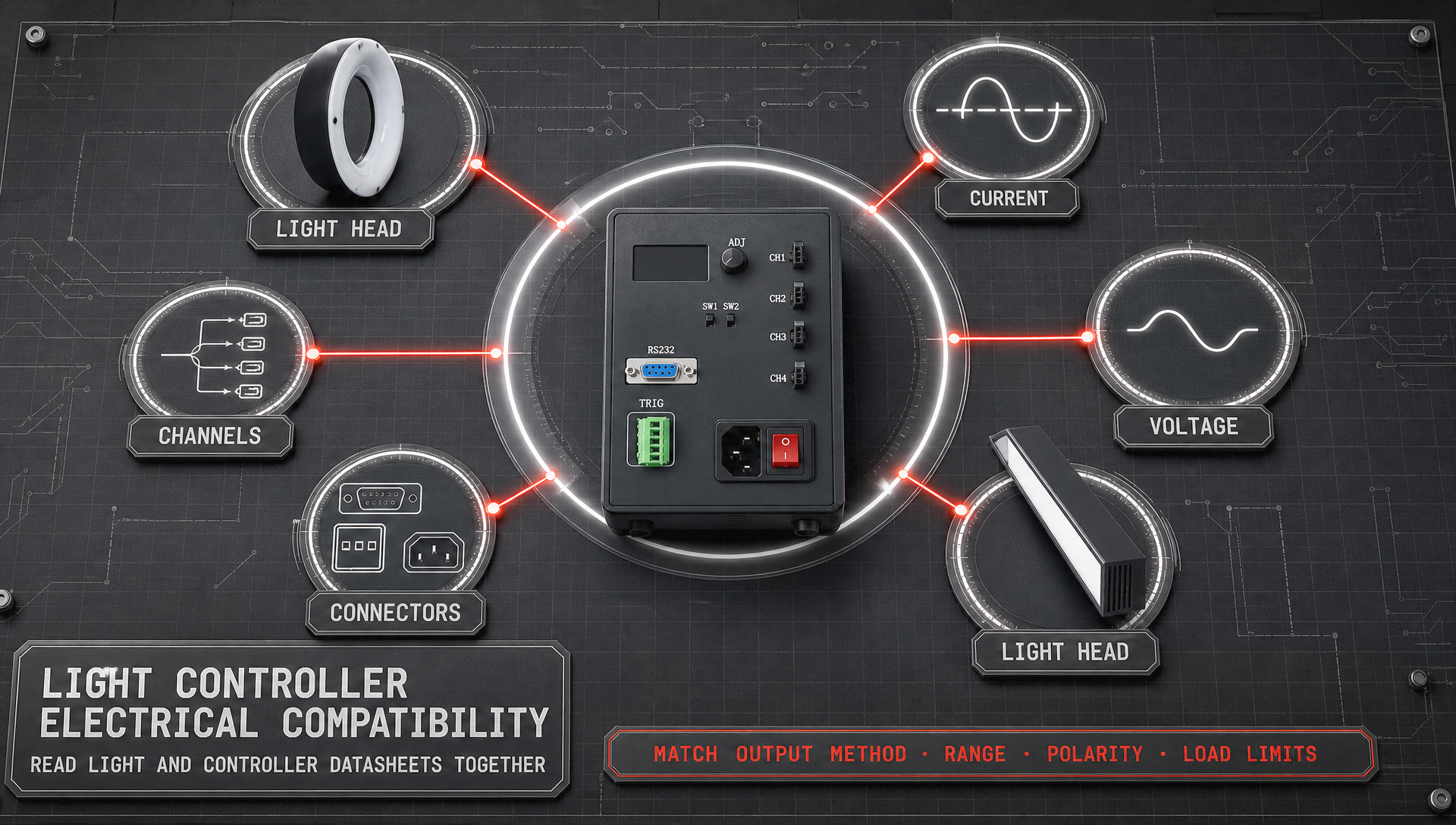
Timing is often the difference between a bright image and a repeatable inspection image. A suitable machine vision light controller should accept the trigger format used by the camera, PLC, or sensor and should make it practical to set delay, pulse width, and intensity. Check whether the controller supports hardware triggering, software configuration, or both. Hardware triggering is usually the safer choice when production timing is tight, because it avoids unpredictable software latency.
Map the sequence before purchase: part-present signal, camera trigger, camera exposure, light pulse, and image acquisition. Then verify the controller’s response time against that sequence. The first thing many teams check is intensity—or, more accurately, brightness at the center of the field—which is not the same as timing accuracy or illumination uniformity across the inspection zone.
Do Not Ignore Uniformity, Dimming Resolution, and Stability
The specification that is easy to overlook is illumination uniformity. If the center of the field is much brighter than the edges, a threshold that works in one area can fail elsewhere. The controller cannot create optical uniformity by itself, but stable current regulation helps preserve the designed output of a uniform light.
Also consider dimming resolution and repeatability. Fine adjustment is valuable during commissioning, especially when you need enough contrast without saturating reflective regions. Ask how settings are stored, whether they can be recalled after a power cycle, and whether a remote interface lets the machine recipe select different levels for different products. If the process uses several part variants, repeatable recipes can be more valuable than a large maximum-current number.
Plan for Thermal Limits and Long-Term Reliability
Heat is a selection input, not an afterthought. Continuous operation, enclosed cabinets, elevated ambient temperature, and repeated high-current pulses all change the thermal load. Review the permitted duty cycle for the exact light-controller combination, not just the controller in isolation. Provide cabinet ventilation and leave practical access for wiring and diagnostic indicators.
Once you stop filtering by purchase price first and start filtering by working distance, illumination angle, exposure, and duty cycle first, the shortlist often changes completely. A controller that costs less but forces an unstable imaging setup can create far greater costs in tuning time, false rejects, and maintenance.
Check Integration and Expansion Requirements
Before finalizing a choice, confirm the interfaces your machine needs: digital trigger I/O, analog intensity control, Ethernet, serial communication, or PLC-compatible signals. Consider whether the controller needs fault outputs, status monitoring, multiple saved recipes, or independent channels for future stations. A complete vision system also has to coordinate the light with the camera, lens, and mechanical fixture; choosing compatible components early reduces commissioning work.
For applications that need application-level guidance, HIFLY combines machine vision lighting and imaging experience with a broader ecosystem of lights, cameras, lenses, and controllers. That can simplify the discussion of system compatibility without assuming that one controller type fits every inspection task.
A Practical Selection Checklist
- Define the inspection outcome: Specify the defect or feature, surface condition, field of view, and line speed.
- Choose the illumination approach: Validate light geometry and wavelength with sample images before selecting drive capability.
- Select the operating mode: Decide between continuous, gated, and strobe operation from exposure and motion requirements.
- Verify electrical compatibility: Match constant-current range, voltage, channels, connectors, and the light’s continuous and pulsed ratings.
- Validate timing: Check trigger type, response time, delay, pulse width, and synchronization with camera exposure.
- Review thermal conditions: Evaluate duty cycle, cabinet temperature, LED cooling, and expected production hours.
- Plan integration: Confirm control interfaces, recipe handling, diagnostics, and possible future channels.
- Test the complete system: Capture images at real production speed and adjust only within the documented limits of the light and controller.