EN
EN


Why choose a machine vision camera with 10GigE over USB3 for multi-camera setups?
When building a multi-camera machine vision system, the interface you choose defines the ceiling of what your entire setup can achieve. A 10GigE camera delivers a dedicated 10 Gigabit Ethernet connection per port, giving each imaging node the raw throughput it needs to sustain high-resolution, high-frame-rate streaming without competing for shared bus bandwidth. USB3, while capable for single-camera deployments, was never architected for the demands of parallel, synchronized, multi-camera industrial lines.
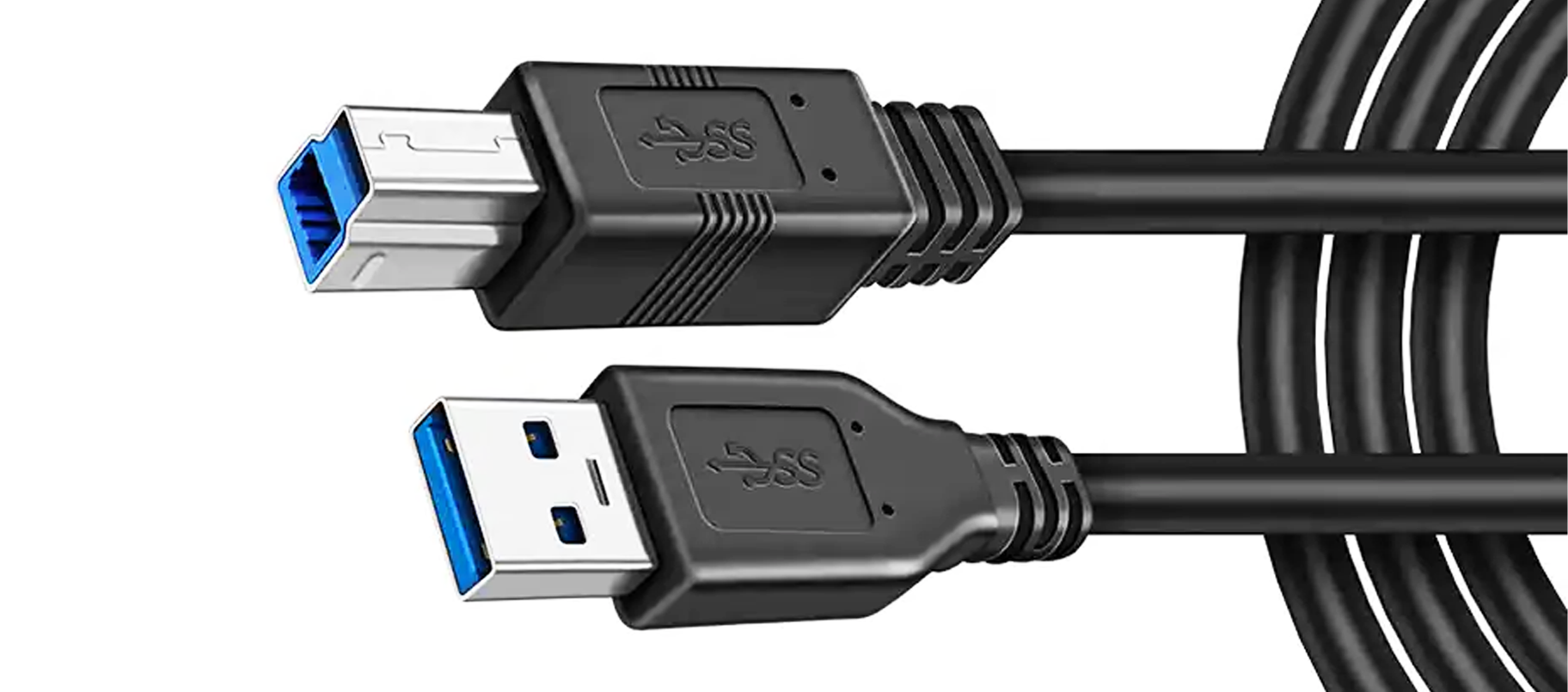
This article explains exactly why engineers and system integrators consistently select a 10GigE camera over USB3 when scaling to multi-camera configurations. The difference is not merely a matter of speed on paper — it comes down to bus architecture, cable infrastructure, synchronization reliability, and long-term scalability. Understanding these factors helps you make a confident, well-grounded hardware decision before your system goes into production.
Bandwidth Architecture in Multi-Camera Environments
How USB3 Bus Sharing Limits Scalability
USB3 operates over a shared host-controller bus. When you connect multiple USB3 cameras to a single host, all devices compete for the same bandwidth pool on that controller. A typical USB3 host controller supports a theoretical maximum of 5 Gbps, but real-world throughput drops significantly once two or more cameras stream simultaneously. Each additional USB3 camera added to a shared controller reduces the available throughput for every other device on that bus. Engineers frequently encounter dropped frames, buffer overflows, and inconsistent transfer rates when scaling USB3 camera counts beyond two per controller.
A 10GigE camera avoids this problem entirely. Because each 10GigE camera connects through a dedicated Ethernet port on a standard network switch or NIC, it maintains its full 10 Gbps channel independently. Adding a second, third, or fourth 10GigE camera to the network does not degrade the individual bandwidth available to each unit. This architecture is one of the most compelling reasons to choose a 10GigE camera for multi-camera builds where consistent data throughput is non-negotiable.
Throughput Headroom for High-Resolution Sensors
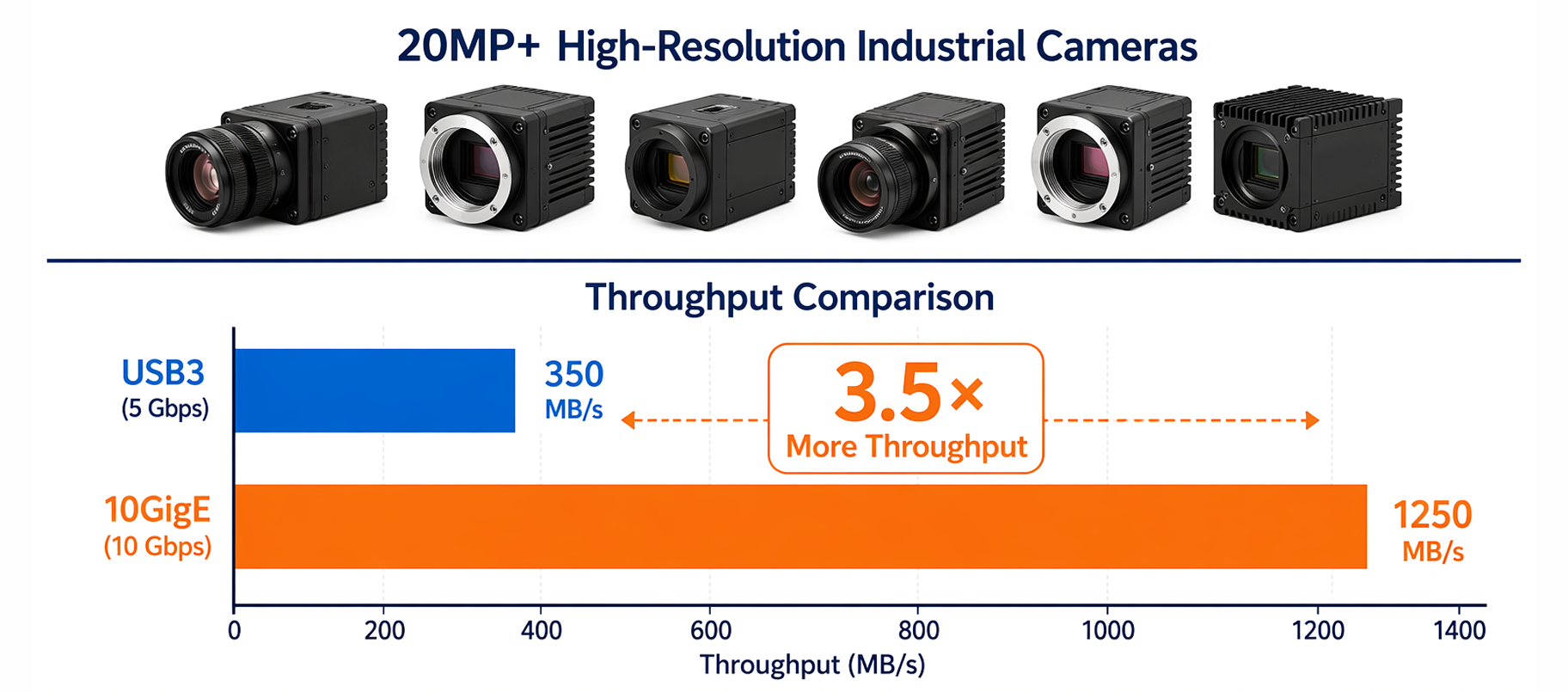
Modern industrial sensors are pushing resolutions beyond 20 megapixels, and high-frame-rate applications demand sustained data rates that USB3 simply cannot support across multiple streams. A single 10GigE camera can sustain up to approximately 1.25 GB/s of usable throughput, which is more than double the practical ceiling of a USB3 link under real-world conditions. When your application requires multiple high-resolution 10GigE cameras running in parallel — such as in semiconductor inspection, flat-panel display testing, or logistics sorting — the throughput headroom of each 10GigE camera becomes a critical operational advantage rather than a theoretical specification.
Cable Reach, Deployment Flexibility, and Infrastructure
Why Cable Distance Matters in Industrial Lines
USB3 cables are typically limited to 3–5 meters before signal integrity degrades, and even with active cable extensions, reliability in electrically noisy industrial environments becomes a concern. A 10GigE camera using standard Cat6a or Cat7 cabling can reliably transmit data up to 100 meters. This is not a minor convenience — in automotive assembly lines, large-format printing inspection systems, or warehouse automation installations, camera-to-host distances routinely exceed USB3's practical limit. Choosing a 10GigE camera means your system design is not constrained by where you can physically place the host PC. You gain genuine layout flexibility that USB3 cannot match.
Standard Ethernet infrastructure also means that a 10GigE camera integrates naturally into existing factory network cabling. IT and facilities teams are already familiar with Ethernet installation practices, reducing deployment complexity and support overhead. The 10GigE camera ecosystem benefits from decades of Ethernet standardization, making it straightforward to add PoE++ support, managed switching, and VLAN isolation for deterministic image data routing in complex plant environments.
Synchronization and Triggering Across Multiple Units
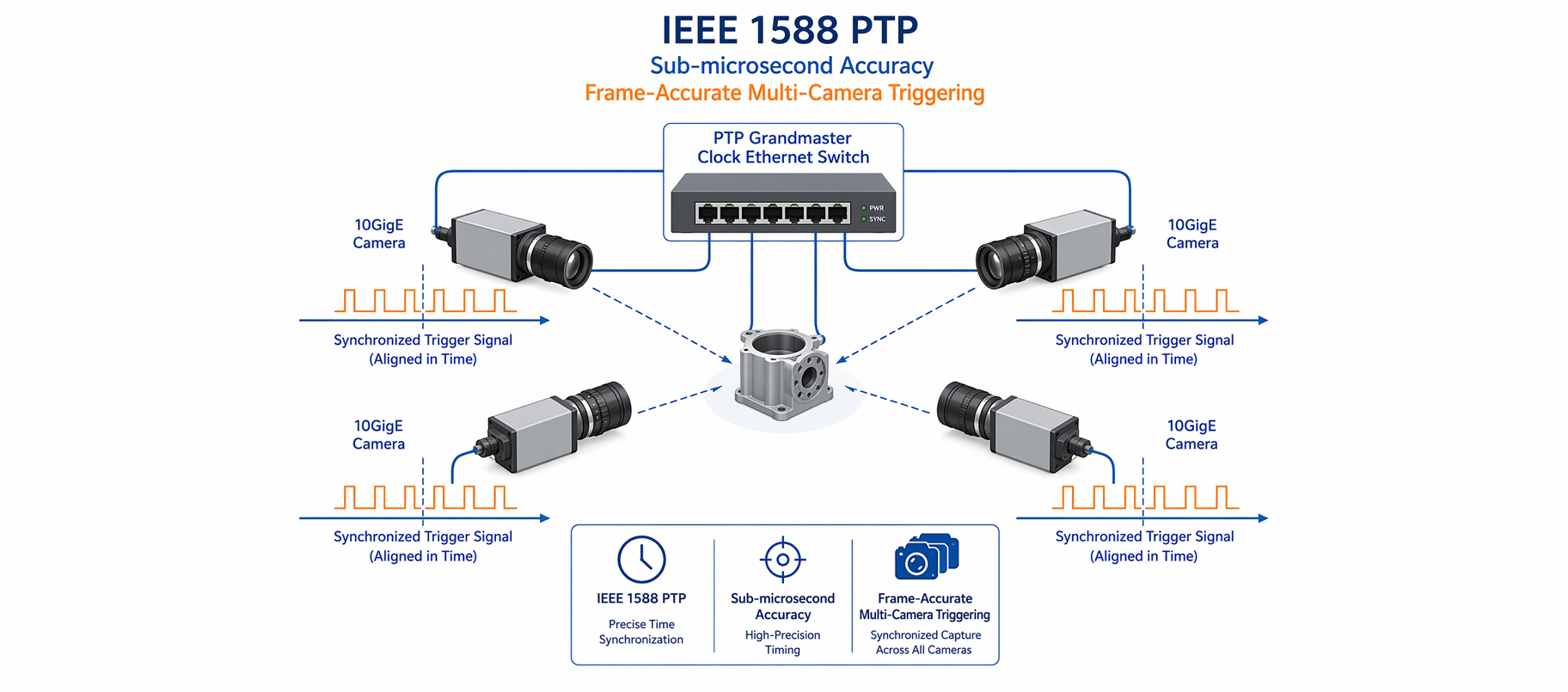
Synchronizing multiple cameras for stereo vision, line-scan reconstruction, or multi-angle inspection requires precise trigger timing. The GigE Vision standard, which governs how a 10GigE camera communicates with a host, includes IEEE 1588 Precision Time Protocol support. This allows each 10GigE camera in a network to synchronize its internal clock to sub-microsecond accuracy with other cameras and with external triggers. USB3 does not natively support hardware-level PTP synchronization, making precise multi-camera timing significantly more difficult to implement and maintain. For applications where frame-accurate synchronization between cameras is mandatory, the 10GigE camera platform provides a robust, standards-based solution.
System Reliability and Long-Term Scalability
Reduced CPU Load and Deterministic Data Transfer
USB3 relies heavily on the host CPU for data transfer management, which means that as camera count increases, CPU overhead rises proportionally. In time-critical inspection systems, elevated CPU load from USB3 camera drivers can introduce latency spikes and missed frames. A 10GigE camera offloads much of the packet processing to the NIC hardware, reducing CPU utilization and enabling more deterministic data delivery. This matters enormously in production environments where a missed inspection frame carries a real quality cost. System designers consistently find that a 10GigE camera setup maintains more predictable performance under heavy multi-camera workloads than an equivalent USB3 configuration.
Scalability Without Hardware Redesign
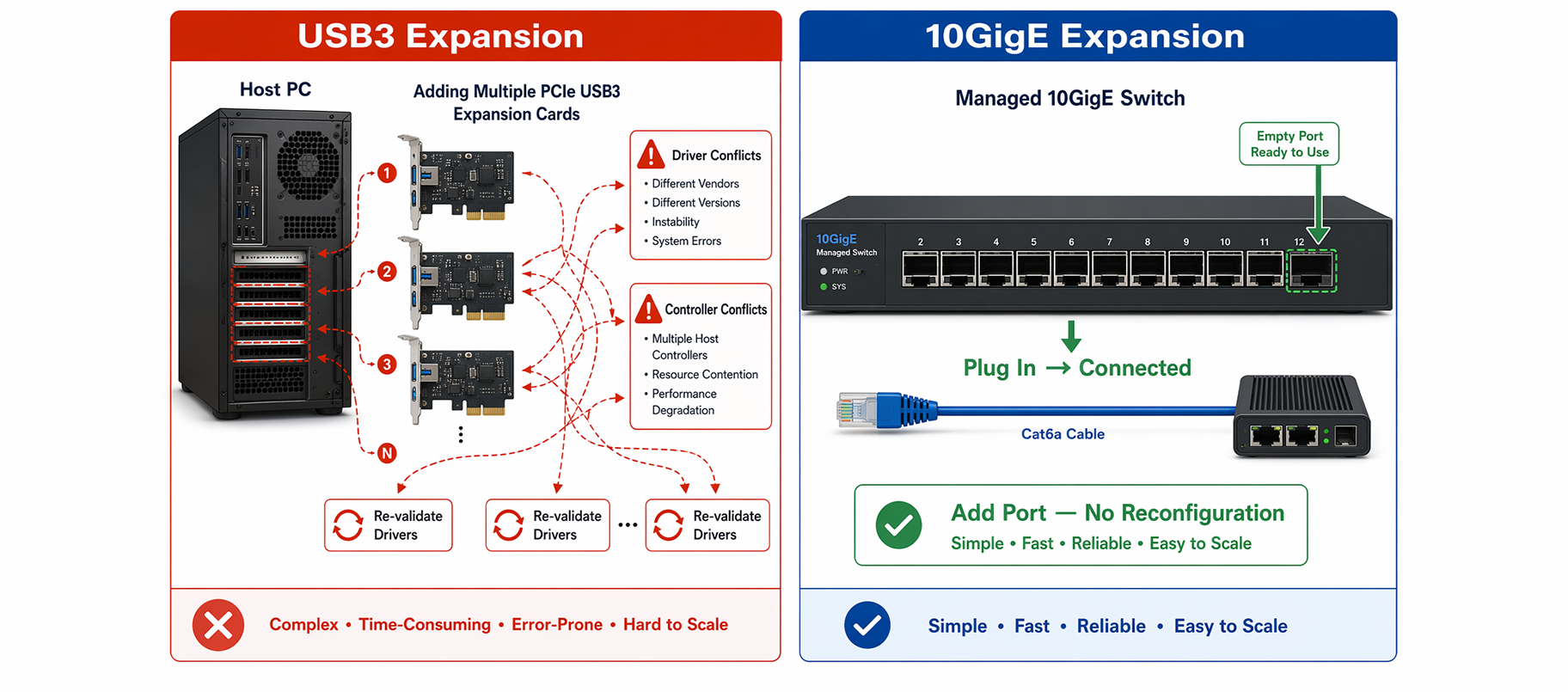
Scaling a USB3 multi-camera system often requires adding PCIe USB3 expansion cards, managing host controller conflicts, and re-validating driver stability — a process that grows in complexity with each camera added. Scaling a 10GigE camera network is comparatively straightforward: add a port to your managed switch, run a Cat6a cable, and connect the new 10GigE camera. The GigE Vision and GenICam standards ensure software compatibility across units, so your acquisition software does not need significant rework when adding another 10GigE camera to the network. This scalability advantage makes the 10GigE camera the logical choice for facilities that anticipate capacity growth over time.
FAQ
Can a 10GigE camera work with a standard Gigabit Ethernet port?
No. A 10GigE camera requires a 10 Gigabit Ethernet port on the host NIC or network switch to operate at full performance. Connecting a 10GigE camera to a 1GbE port will result in a speed negotiation down to 1 Gbps, which eliminates the bandwidth advantage. Always match your host interface to the 10GigE camera specification.
How many 10GigE cameras can run simultaneously on one system?
The number of simultaneous 10GigE cameras depends on available NIC ports, PCIe bandwidth, and host CPU performance. Many industrial systems run four to eight 10GigE cameras concurrently using a multi-port 10GbE NIC or a dedicated managed switch. Each 10GigE camera maintains its own independent 10 Gbps channel, so scaling is limited by host infrastructure rather than by shared bus contention.
Is a 10GigE camera compatible with GigE Vision software?
Yes. A 10GigE camera that complies with the GigE Vision standard is fully compatible with GigE Vision-compliant acquisition software and SDKs. This means your existing software framework, whether it is based on GenICam or a major machine vision SDK, can control and acquire images from a 10GigE camera without requiring a complete software overhaul.