EN
EN


Industrial Camera Guide for Factory Automation & Inspection
Key Industrial Camera Specifications for Automation Success
Resolution, Frame Rate, and Field of View: Aligning Performance with Inspection Requirements
The resolution needs to be good enough to catch the tiniest flaws we want to see. Take a 5 megapixel camera placed about half a meter away from what it's looking at - this setup can pick out details as small as one tenth of a millimeter. When it comes to frame rates, they need to beat the speed of whatever is moving on the production line so there's no blurring from movement. Packaging lines that run really fast usually need something over 120 frames per second. The field of view matters too. We have to make sure everything important fits within the camera's sight without stretching things too thin. If the view is too tight, some problems might slip past unnoticed near the edges. But if it's too broad, then even small issues won't show up clearly. Speaking of reading text, most industry guidelines say we need at least 2.5 pixels for each character if we want our optical character recognition systems to work properly. This helps ensure that almost all characters get recognized correctly, somewhere around 99.7 percent accuracy or better in practice.
Environmental Hardening: IP Rating, Shock/Vibration Resistance, and Thermal Operating Range
According to manufacturer reliability tests, cameras lacking IP65+ protection tend to break down about three times quicker when exposed to dust or moisture. When it comes to vibration, anything over 15G helps keep the camera focused properly on those robotic arms. Temperature range matters too. Most industrial cameras need to handle conditions from minus 20 degrees Celsius all the way up to 70 degrees without losing their calibration. That means they work reliably whether sitting in a cold storage facility handling frozen foods or operating near scorching metal casting operations where temperatures spike. The main factors for durable performance? Let's look at some key specifications that really matter in real world applications.
| Specification | Minimum Requirement | Critical Application |
|---|---|---|
| IP Rating | IP67 | Food processing washdown zones |
| Shock Resistance | 100G/1ms | Automotive assembly robots |
| Operating Temperature | -30°C to 85°C | Metal casting quality control |
Systems lacking these specifications incur 42% more unplanned downtime in harsh industrial settings.
Industrial Camera Types and Their Targeted Inspection Roles
Area Scan vs. Line Scan Cameras: Optimizing for Defect Detection, OCR, and High-Speed Measurement
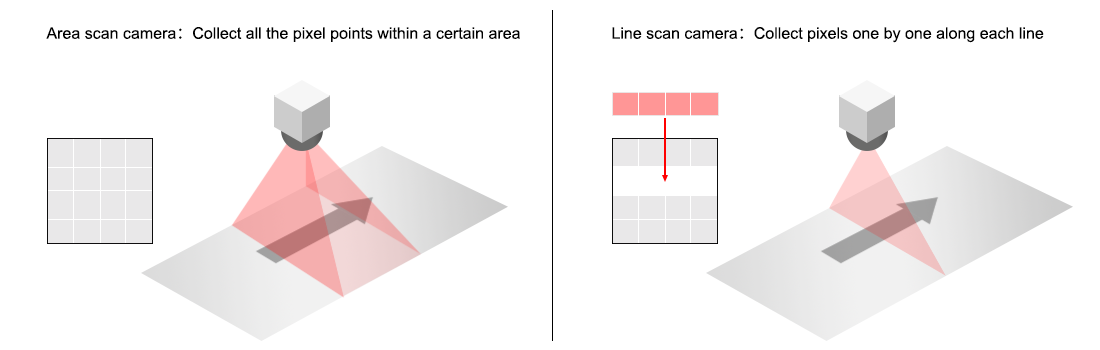
Area scan cameras take complete pictures all at once, which works great for things that don't move much or only move sometimes, such as printed circuit boards, bottles, or those sealed product packages. These cameras are really good for spotting problems on surfaces like scratches or color changes, checking if products are the right size, and reading text from labels that stay in one place. Line scan cameras work differently by collecting data line by line continuously. This makes them perfect for looking at stuff that moves quickly through production lines like fabric rolls, paper sheets, or metal strips going faster than 5 meters per second. What sets these apart is their ability to keep scanning without stopping, giving detailed views across materials that can be very long or even endless in length.
3D, Smart, and AI-Embedded Industrial Cameras: Enabling On-Device Analysis and Closed-Loop Control
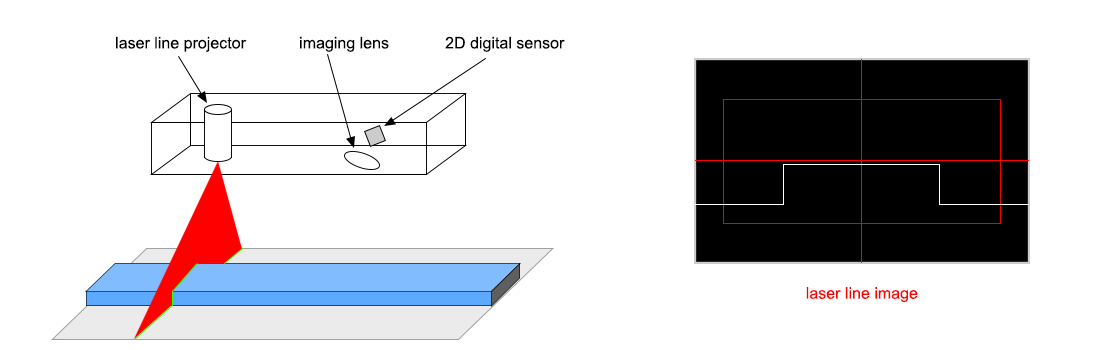
Three dimensional cameras rely on either stereo vision techniques or laser triangulation methods to create accurate depth maps that are really important for things like profiling weld seams, guiding bin picking operations, or checking how full containers are. The smart camera models come with built in processors that handle standard vision algorithms right at the source, which cuts down on waiting time by around 40 percent compared to those old PC based systems according to the Machine Vision Report from 2023. Some versions even take it a step further by running small scale neural networks straight on the device itself for immediate classification tasks. This allows for quick response actions like rejecting faulty parts within just 50 milliseconds, adjusting robot movement paths dynamically, or doing automatic quality assessments all without needing any cloud computing resources or extra hardware support.
Seamless Integration of Industrial Cameras into Factory Vision Systems
Vision Interfaces Compared: GigE Vision, USB3 Vision, and CoaXPress for Bandwidth, Distance, and Real-Time Reliability
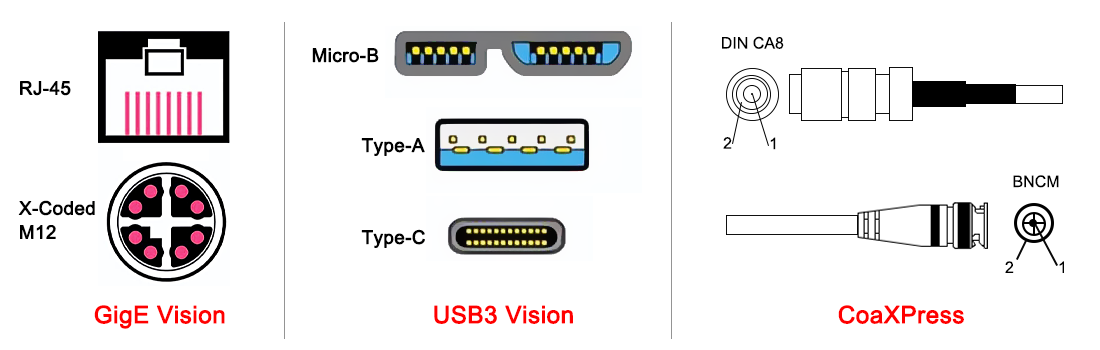
When choosing an interface, three main factors come into play: bandwidth capabilities, how far the cables can run, and whether timing remains predictable. GigE Vision makes good use of regular Ethernet wiring which saves money when setting things up. It works well for installations spread out across larger areas since it handles distances up to about 100 meters while maintaining speeds around 1 gigabit per second. That's why many factories use it for inspections that don't require super fast processing. On the other hand, USB3 Vision has become popular because connecting devices is straightforward without needing special tools or configurations. The transfer speed hits around 5 gigabits per second, though the cables only work reliably within about five meters. This makes USB3 great for smaller workspaces where equipment sits close together on benches. For situations demanding extreme performance, CoaXPress stands out as the top option. These interfaces push data at incredible rates up to 25 gigabits per second through traditional coaxial cables that stretch beyond 40 meters. What really matters here is the response time stays consistent under just one millisecond. According to recent industry benchmarks from 2024, this level of precision becomes absolutely necessary in applications such as rejecting defective products instantly during production lines where even tiny delays matter.
Optics, Lighting, and Synchronization: Ensuring Repeatable Image Quality in Production Environments
Getting consistent images time after time requires good coordination between all the hardware components, not just setting up a camera. The right high res lenses matter too, especially ones with those special anti reflective coatings that keep things clear even when there's dust floating around or oil mist in the air. For moving parts, structured lighting works wonders. Pulsed LED arrays are particularly effective at freezing action during really short exposure times, sometimes down to about 0.1 milliseconds. That stops blurry images on conveyor belts running at speed. When it comes to triggering the actual image capture, hardware synchronization with encoder signals makes all the difference. This approach lines up exactly where the part is located within half a millimeter accuracy. We've seen shops cut their false reject rates nearly two thirds compared to systems relying solely on software triggers for timing.
Ready to Optimize Your Factory’s Industrial Camera Setup?
Selecting the right industrial camera and integrating it seamlessly into your vision system is the key to unlocking maximum efficiency for factory automation and inspection. From aligning specs (resolution, frame rate, environmental hardening) to choosing the right interface and coordinating optics/lighting/synchronization, every step must be tailored to your unique production needs.
With 15 years of machine vision expertise, HIFLY offers a full range of industrial cameras (area scan, line scan, 3D, smart) and matching solutions for lenses, lighting, and system synchronization—all backed by ISO 9001:2015 certification and global technical support. For a no-obligation consultation to select the industrial camera that aligns with your factory automation and inspection goals, contact us today.