EN
EN


How to Choose the Pixel Format for Industrial Cameras?
In setting up an industrial vision system, many people overlook a key parameter—the pixel format. However, it directly determines image storage efficiency, color reproduction fidelity, and data processing load. Choosing correctly can double inspection efficiency, while choosing wrong may lead to false or missed detections.
I. What Exactly is a Pixel Format?
Simply put, a pixel format is the data storage method and organizational rule for each pixel when an industrial camera captures an image. It's like the "packaging method for image data"—different packaging methods determine the data volume, the information contained (grayscale/color), and the difficulty of subsequent processing.
The core value of an industrial camera is "accurately acquiring effective information," and the pixel format directly filters and defines "which information is acquired." For example, if only determining whether a part is defective, capturing color information is unnecessary; if distinguishing colored materials is required, a format that can reproduce color must be chosen. Common pixel formats for industrial cameras are mainly divided into four categories: Mono, Bayer, RGB, and YUV.
II. Four Common Pixel Formats:
Four Common Pixel Formats: Characteristics, Differences, and Applicable Scenarios
The core differences among pixel formats lie in "whether they contain color information" and "how color information is stored," which also determines their applicable scenarios. Let's break them down one by one:
1. Mono Format: The 'King of Efficiency' for Monochrome Imaging
The Mono format, or monochrome (grayscale) format, is the mainstream choice for industrial black-and-white cameras. Its core characteristic is that each pixel stores only luminance information (grayscale value) and contains no color information. For instance, Mono 8 means each pixel is stored with 8 bits, with a grayscale range of 0-255 (0 is pure black, 255 pure white); Mono 10 uses 10 bits, offering a grayscale range of 0-1023 with richer detail.
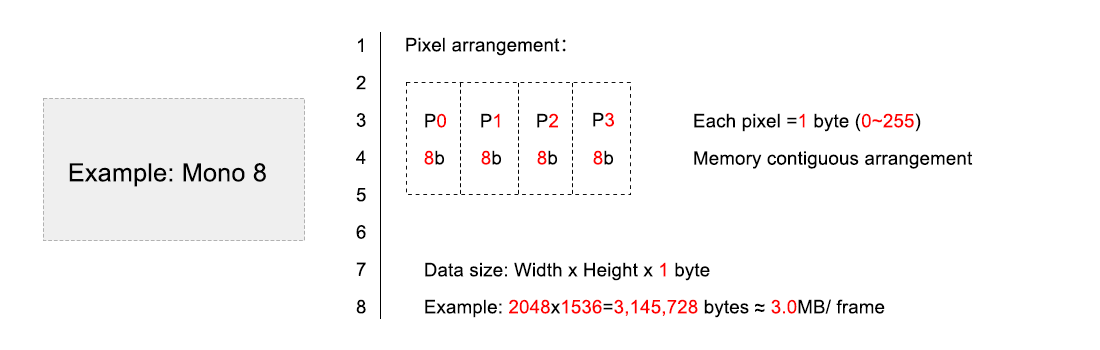
Core Advantages: Smallest data volume, highest storage and transmission efficiency, and consequently the highest possible camera frame rate; lower sensitivity to lighting variations, resulting in strong inspection stability.
Applicable Scenarios: Inspection tasks requiring no color distinction, such as part dimensional measurement, surface defect detection (scratches, cracks, missing material), barcode reading, etc. For example, a 3C product bezel dimension inspection project used Mono 8 format, achieving a camera frame rate of 300 FPS, far exceeding that of color formats, perfectly matching high-speed production line cycles.
2. Bayer Format: The 'Raw Data Format' for Color Cameras
The Bayer format is the "native format" for color industrial cameras. Its core design philosophy is "acquiring color information with minimal data." A Bayer color filter array (common patterns like RGGB, BGGR) is overlaid on the camera sensor. Each pixel records only one of the three primary colors—red, green, or blue. The information for the other two colors needs to be calculated through interpolation from neighboring pixel values.
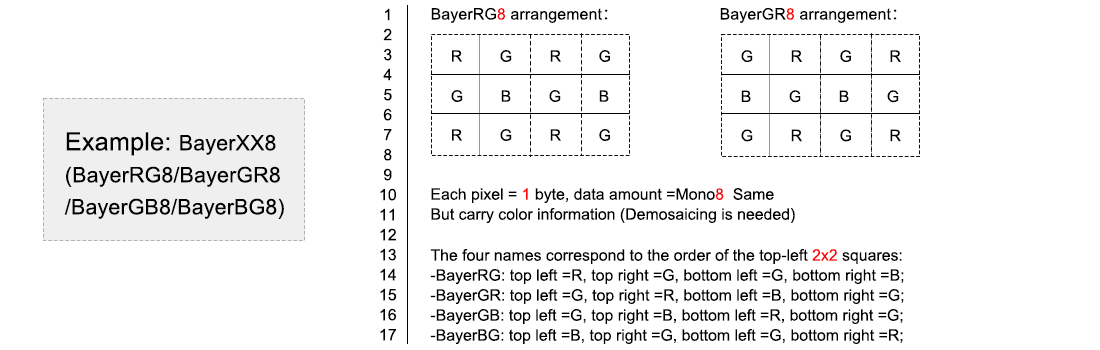
Core Advantages: Data volume is much smaller than RGB format (close to Mono), balancing a certain level of color recognition capability with frame rate and storage efficiency.
Limitations: Color accuracy relies on interpolation algorithms, leading to slight color deviations, and false colors may appear at edges.
Applicable Scenarios: Color detection tasks with moderate color accuracy requirements, such as material color sorting (distinguishing red, blue, green packaging), judging if product appearance color is off, etc. For example, a food packaging sorting line uses a Bayer format color camera to distinguish different flavor packages, meeting inspection needs while keeping data processing load manageable.
3. RGB Format: The 'Restoration King' for Color Imaging
RGB is the standard color format. Each pixel contains complete information for the Red (R), Green (G), and Blue (B) channels, requiring no interpolation. It offers the most authentic color reproduction. Common RGB 24 format uses 24 bits per pixel (8 bits per channel), providing a rich color range and extremely high fidelity.
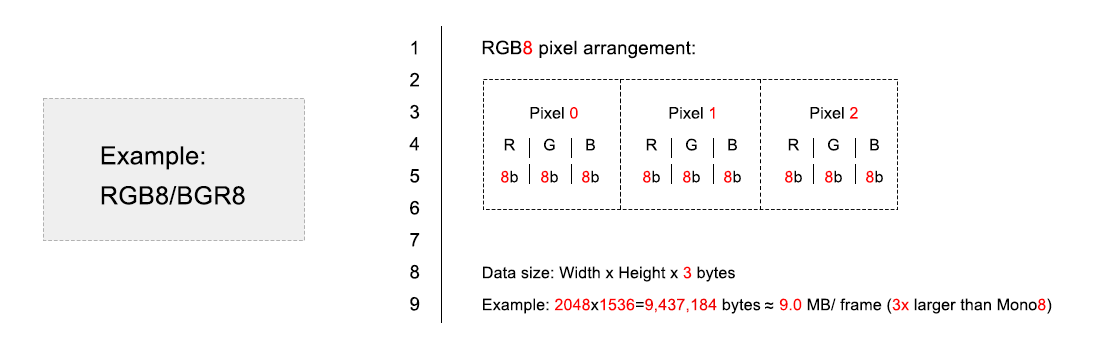
Core Advantages: Accurate color reproduction, rich details, suitable for scenarios requiring fine color analysis.
Limitations: Largest data volume (3 times that of Mono 8), consumes significant storage and bandwidth, reduces camera frame rate, and increases subsequent algorithm processing load.
Applicable Scenarios: Tasks with extremely high color accuracy requirements, such as textile color difference inspection, cosmetic appearance color grading, printed material color calibration, etc. For example, a high-end garment fabric inspection project must use RGB 24 format to accurately distinguish subtle color differences on the fabric and prevent defective products from leaving.
4. YUV Format: The 'Efficient Choice' for Video Processing
The YUV format is specifically designed for video transmission and processing. Its core advantage is "separating luminance and chrominance information": Y represents luminance (brightness/grayscale) information, while U and V represent chrominance (color) information. Because the human eye is more sensitive to luminance changes than to chrominance changes, the YUV format can compress data volume by "reducing the sampling rate of chrominance information" while maintaining visual quality.
Common YUV subsampling formats are YUV 4:2:2, YUV 4:4:4, and YUV 4:2:0. Generally, larger numbers mean more complete chrominance information and larger data volume (YUV 4:4:4 ≈ RGB 24, YUV 4:2:2 ≈ 2/3 of RGB 24, YUV 4:2:0 ≈ 1/2 of RGB 24).
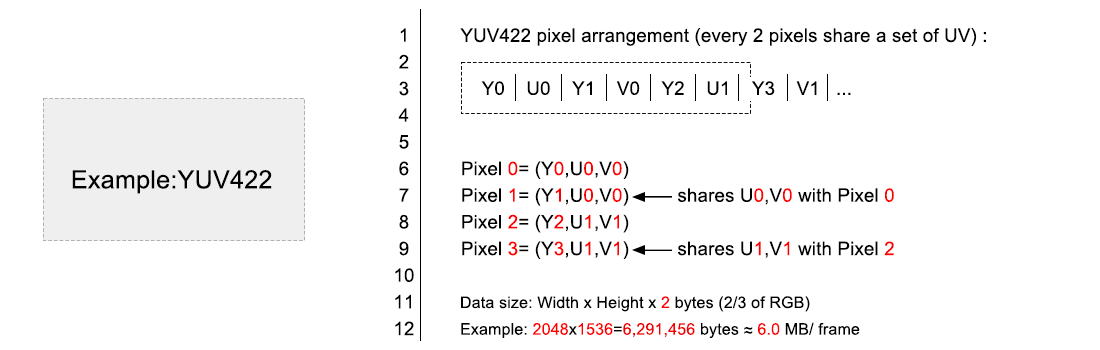
Core Advantages: Smaller data volume than RGB, color reproduction close to RGB, balancing efficiency and effect; the separation of luminance and chrominance makes subsequent image processing (e.g., edge detection, object tracking) more efficient.
Applicable Scenarios: Industrial scenarios requiring dynamic video analysis, such as dynamic workpiece tracking on conveyor belts, moving object defect inspection, industrial monitoring, etc. For example, a dynamic tracking project on an automotive parts assembly line uses YUV 4:2:2 format, ensuring color recognition capability while maintaining smooth video transmission and processing.
III. Key Supplement: The Relationship Between Pixel Format and Packing
When discussing pixel formats, the concept of "Packing" often comes up. Its core purpose is to optimize storage space and avoid waste.
Without packing, the camera typically stores pixel data in fixed-size memory spaces (e.g., 16 bits). For example, for Mono 10 format (10 bits per pixel), if stored unpacked, it might occupy 16 bits, wasting the remaining 6 bits. The Mono 10 Packed format, however, packs the 10-bit data tightly into a 12-bit space (or other optimized structure), wasting only 2 bits, significantly improving storage and transmission efficiency.
Practical Advice: In scenarios with bandwidth or storage constraints (e.g., high-speed inspection, long-term continuous acquisition), prioritize pixel formats with "Packed" in their name to reduce data waste.
IV. Four-Dimensional Comparison: Choosing the Right Pixel Format Quickly
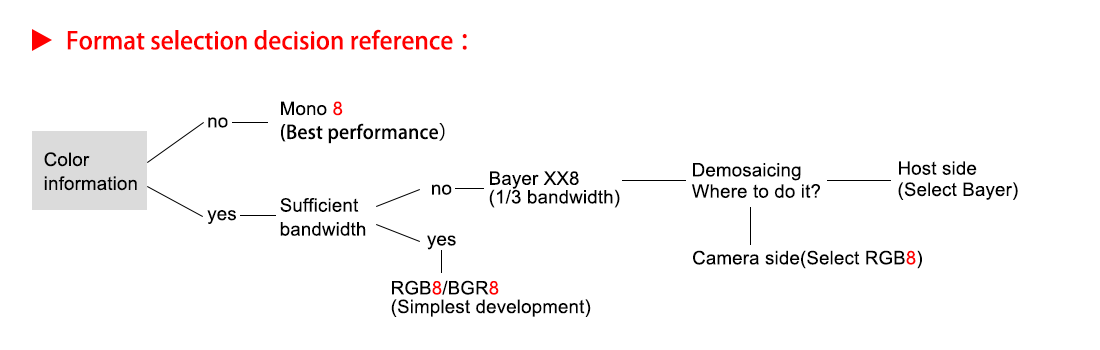
For quick selection, we compare the four formats across four core dimensions: "Pixel Information, Data Volume, Frame Rate, and Imaging Effect."
Pixel Information: Mono (grayscale only) < Bayer (single-channel color + interpolation) < YUV (luminance + chrominance separated) < RGB (full three-channel color).
Data Volume: Mono ≈ Bayer < YUV (4:2:0 / 4:2:2) < YUV 4:4:4 ≈ RGB.
Frame Rate: Mono Bayer YUV RGB (For the same camera model, smaller data volume enables higher frame rate).
Imaging Effect: RGB (accurate color) ≈ YUV 4:4:4 YUV 4:2:2 Bayer (slight color deviation); Mono (clear grayscale detail, no color).
V. Practical Guide: How to Set the Pixel Format
The steps for setting the pixel format are simple, but there is one crucial prerequisite: You must first stop the camera's image acquisition stream; otherwise, parameters cannot be changed. Specific steps are as follows:
Open the camera control software (e.g., Halcon, LabVIEW, the camera manufacturer's software) and connect to the target industrial camera.
In the software's "Camera Parameters" or "Property Tree," find the "Pixel Format" option.
First, click the "Stop Acquisition" button to ensure the image stream is halted.
In the Pixel Format dropdown menu, select the required format (e.g., choose Mono 8 for part defect detection, Bayer GR8 for sorting colored materials).
Click "Start Acquisition" and verify if the image meets requirements. If not, repeat steps 3-4 to adjust.
Note: Pixel formats supported by different camera manufacturers may vary slightly (e.g., some support Mono 12, RGB 32). Selection should be based on camera specifications and inspection needs.
Final Thoughts: The Core Logic of Selection is 'Matching Requirements'
To summarize: When choosing a pixel format, don't chase the "most advanced," just aim for "matching the requirements."
Remember three core principles:
① If color is unnecessary, prioritize Mono (highest efficiency).
② If simple color distinction is needed, choose Bayer (balances efficiency and cost).
③ If precise color analysis or dynamic video analysis is required, choose RGB or YUV (select the subsampling format based on data volume needs).
Master this logic, combine it with the practical setup method, and you'll easily handle the selection and configuration of industrial camera pixel formats, making your vision system more efficient and stable.